- Meta’s data ingestion system, which our engineering teams leverage for up-to-date snapshots of the social graph, has recently undergone a significant revamp to enhance its reliability at scale.
- Moving from our legacy system to our new architecture required a large-scale migration of our entire data ingestion system.
- We’re sharing the solutions and strategies that enabled a successful large-scale system migration, as well as the key factors that influenced our architectural decisions.
At Meta, our social graph is powered by one of the largest MySQL deployments in the world. Every day, our data ingestion system incrementally scrapes several petabytes of social graph data from MySQL into the data warehouse to power the analytics, reporting, and downstream data products that teams across the company utilize for tasks ranging from day-to-day decision-making to machine learning model training and product development.
We’ve recently revamped our data ingestion system’s architecture to significantly enhance its efficiency and reliability. The new architecture moves away from customer-owned pipelines, which functioned effectively at a small scale, to a simpler self-managed data warehouse service that still operates efficiently at hyperscale.
We’ve successfully transitioned 100% of the workload and fully deprecated the legacy system. But migrating a data ingestion system of this scale was a major challenge. Several important solutions and strategies helped make a migration of this scope successful.
The Migration Challenge
As our operations grew in scale, our legacy data ingestion system began to show signs of instability under the increasingly strict data landing time requirements. We knew we needed to migrate to a new system. But we also knew that meant facing challenges around not only how to make sure each job would be migrated seamlessly but also how to perform large scale migration itself.
Ensuring a Seamless Transition
Ensuring a seamless migration meant we had to effectively track the migration lifecycle for thousands of jobs and put robust rollout and rollback controls in place to handle issues that might arise during the migration process.
The Migration Lifecycle
Our first step was to establish a clear migration job lifecycle to ensure data integrity and operational reliability throughout the process.
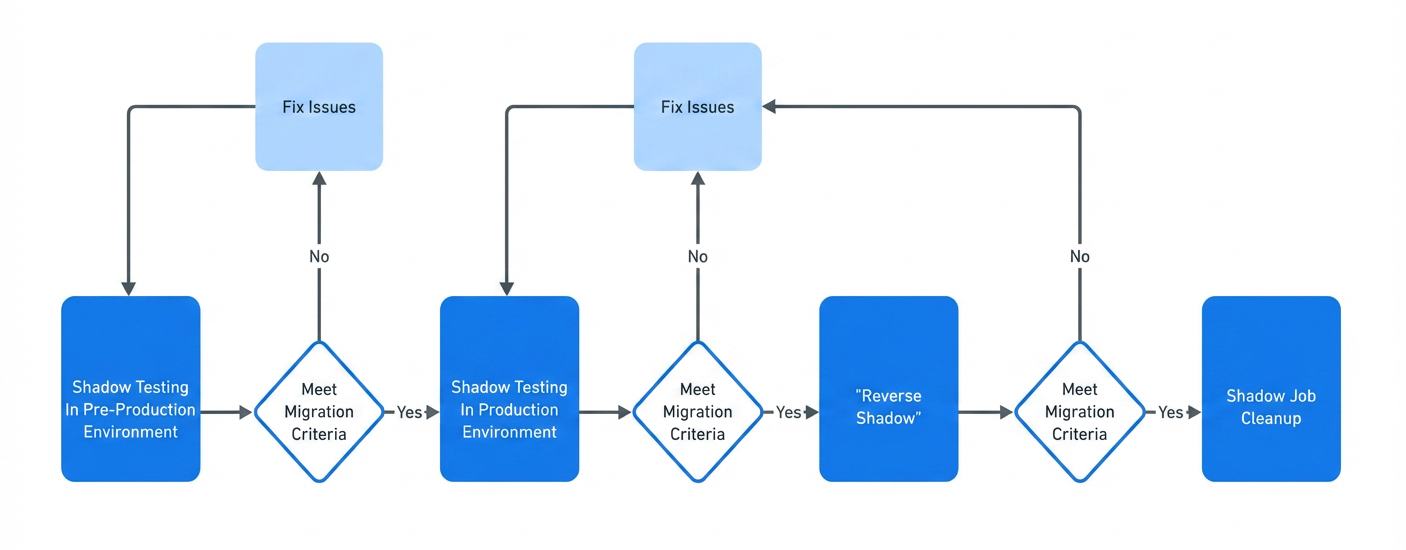
Each job needed to be verified for correctness and had to meet defined success criteria before moving to the next step of the migration lifecycle:
- No data quality issues. There is no difference between the data delivered by the old system and the new system. We verify this by comparing both the row count and the checksum of the data, ensuring complete consistency between the two systems.
- No landing latency regression is observed. The data delivered by the new system should exhibit improved landing latency, or at minimum, match the performance of the old system.
- No resource utilization regression is observed. The compute and storage usage of the job running in the new system should be improved, or at minimum, be comparable to that of the old system.
- For the critical table migration, we defined and agreed on extra migration criteria with the teams who were reliant on the service.
Phase 1: The Shadow Phase
In the first step of the lifecycle we set up shadow jobs in the pre-production environment to be delivered via the new system. This is essentially a production-realistic test that each shadow job consumed the same source as the production job but delivered data to a different table called the shadow table. This setup can help reveal issues because it exposes the new system to real production data and behavior, while still providing an isolated place to inspect outcomes and deploy fixes quickly.
We continuously monitored row count and checksum mismatches between the production jobs and the shadow jobs. When mismatches occurred, we quickly investigated the root cause and deployed fixes to the pre-production environment, then verified that the mismatch was resolved.
During this step, we also measured the compute and storage quotas for the shadow jobs to ensure that the production environment had sufficient resources before proceeding.
If the shadow job met the above criteria it moved to the production environment and made sure the job could still run reliably in the production environment before moving to the next step.
Phase 2: The Reverse Shadow Phase
Once the production job and the shadow job were running reliably in the production environment, we began the reverse shadow phase. In this phase, the shadow job’s data was written to the production table, effectively making the shadow job the new production job. Meanwhile, the production job’s data was written to the shadow table, so the original production job then acted as the shadow job.
This approach provided two key benefits. First, we could still get ongoing data-quality signals after rollout by continuing to compare outputs from the two systems. Second, we could roll back fast if discrepancies were detected, without needing to recreate or reconfigure the old system job.
Phase 3: Migration Cleanup
We continued to monitor and compare the data delivered by both jobs. If no discrepancies were detected, the shadow job, now running on the old system, was removed. The new system then took over and continued delivering data through the production job, marking the completion of the migration.
Custom Data Quality Analysis Tooling
We also built a comprehensive set of debugging tools to help team members efficiently identify and resolve issues that might arise during the migration.
We developed a data quality analysis tool to ensure that edge cases across jobs are effectively captured and addressed. For each landed shadow table partition, the system would read the corresponding production table partition and compare both the row count and checksum. Any mismatches were logged to Scuba, Meta’s data management system for real-time analysis. Every hour, the data quality analysis tool read the logs from Scuba, ran queries to identify example rows causing mismatches, and logged detailed debugging information back to Scuba. This process enabled team members to quickly determine the root cause of issues and assess whether they were already known and being addressed.
This same data quality analysis tool is still in use after the migration as part of the release validation process.
Handling Rollout and Rollback
Both our legacy and new data ingestion systems used change data capture (CDC) to incrementally ingest data into the target table. Each data ingestion job has its own internal table for a full dump of source databases (full dump), an internal table for capturing changes of source databases (delta), and the target table consumed by the data customers. All the information about job entities, including table names and table schemas, is saved and managed by the central management service.
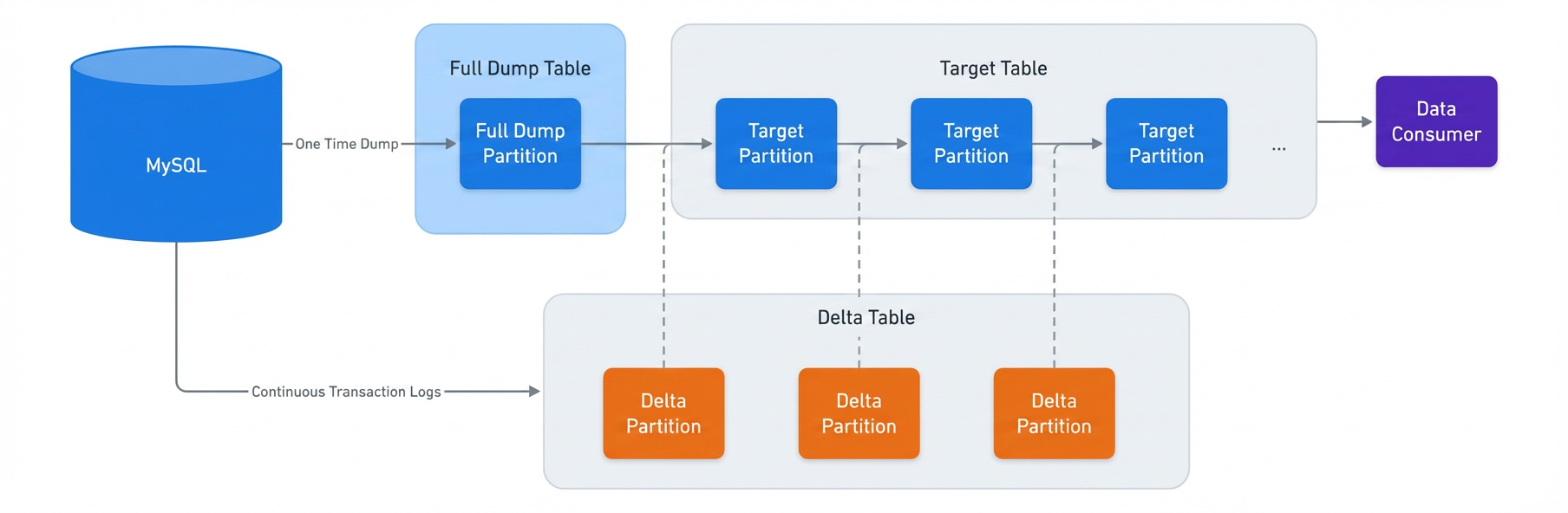
Being a CDC process means the data generated by the system is used again to generate the new data. This means if previous landed data has any issues the problematic data will be passed to the new landed data. If issues were to happen after the migration we’d need to perform a rollback to fix the landed data to stop the bleeding.
To reduce the risk, we focused on two solutions:
- Early signals before problematic data are landed on the data customer.
- How to stop the bleeding quickly during rollback.
Early Signals After Rollout
Rather than waiting for data consumers to discover issues with problematic data, we received early signals indicating whether the migration is successful. As previously mentioned, after the rollout, the migration entered the reverse shadow phase. This meant the shadow job’s data was written to the production table, effectively making the shadow job the new production job. And the production job’s data was written to the shadow table, so the original production job now acts as the shadow job.
To get the early signals, we triggered backfill on both production and shadow jobs. If the backfill results still matched it indicated the migration is successful. If the result did not match, the job would be rolled back immediately and data consumers would not be impacted.
Stopping the Bad Data Propagation Quickly During Rollback
As previously mentioned, one characteristic of the CDC process is that problematic data can propagate to newly generated data. Quickly stopping the spread of bad data not only makes the migration more robust but also improves reliability after the migration is complete.
During the reverse shadow phase, if any data quality issues were detected in a specific partition, that partition would be marked in its metadata as having bad data quality. If this partition was a delta partition, then new data would stop landing, and an alert would be sent to a team member. If this partition was a target partition, the system would instead select an older partition and merge it with more deltas.
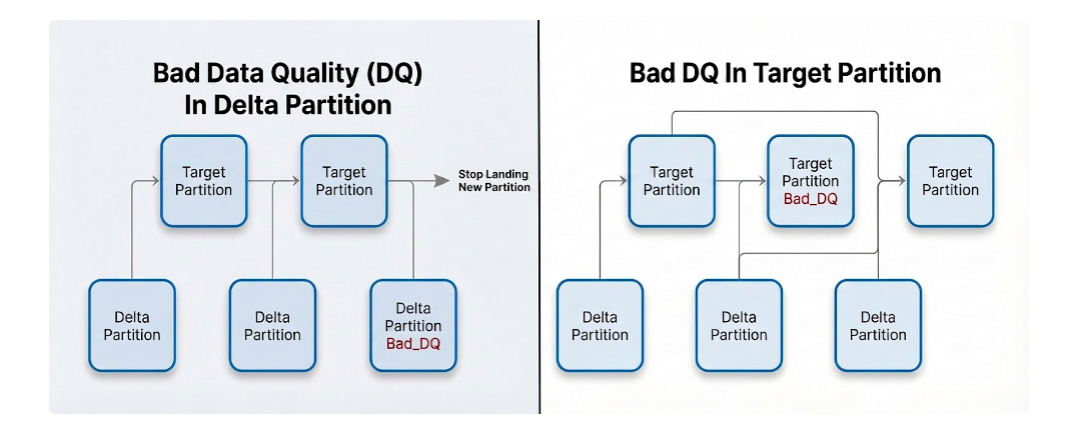
In this way we could stop bad data propagation quickly. For rollback, we could quickly query the metadata to find all partitions that were marked with bad data quality and fix them with backfill.
How We Executed the Large-Scale Migration
After successfully migrating a small batch of jobs, we were confident we would perform the full migration. The challenges in doing so roughly fell into two buckets:
- How to monitor and migrate large numbers of jobs automatically. (This challenge is intensified by the sheer volume of jobs to migrate).
- How to do effective shadow testing with limited capacity.
Monitoring With Automated Tooling
With tens of thousands of ingestion jobs to migrate we developed tooling that automated the entire process and minimized friction.
Running shadow tests and addressing edge cases across such a large job set requires robust automation and thorough validation to ensure reliability and correctness.
Since we established a clear migration job lifecycle and job promotion criteria, the system continuously sent job status signals to Scuba, including data related to the lifecycle promotion criteria and the job’s current stage in the migration lifecycle. We built external migration tools that continuously monitored signals from each job and automatically promoted or demoted jobs between stages of the migration lifecycle, depending on whether they met (or no longer met) the migration criteria. We also built system-level and job-level dashboards so engineers could quickly track the overall migration progress as well as monitor and debug individual jobs.
Planning With Limited Capacity
Because migration capacity was limited, we could not run all shadow jobs at once. Instead, we migrated the jobs in batches. Migration efficiency depends heavily on how jobs are selected for each migration batch.
We categorized jobs according to various features such as throughput, priority, and special cases. Engineering teams worked to ensure that the environment was properly prepared before creating a batch. For instance, they established selection criteria to exclude jobs with known issues that were still being resolved, thereby reducing noise caused by duplicate issues. Jobs were also prioritized based on business need and teams who were reliant on the service were notified ahead of migration.
We avoided creating new shadow jobs with known issues until those issues were resolved. When an issue was detected we removed any potentially affected jobs from the migration list and held them until a fix was in place.
As noted above, due to the system’s CDC design, a new job’s first snapshot was landed via a full dump, which is typically slow and expensive. If we detected data quality issues in a landed snapshot we also triggered another full dump to land a corrected snapshot after the underlying bugs were fixed. Creating shadow jobs while known issues were still present would therefore trigger a lot of unnecessary full dumps, both at job creation time and again during data-quality remediation. By avoiding creating those jobs, we avoided large amounts of extra full dump work and improved migration efficiency. We also built creative solutions like reusing snapshot partitions delivered by the old system as snapshot initially to reduce the full dump load.
Acknowledgements
We would like to thank all the team members and the leadership that contributed to make this project a success in Meta.